

Most websites don't fail all at once. They fail slowly, in ways nobody notices until something forces a closer look: a customer complaint, an audit, or something worse.
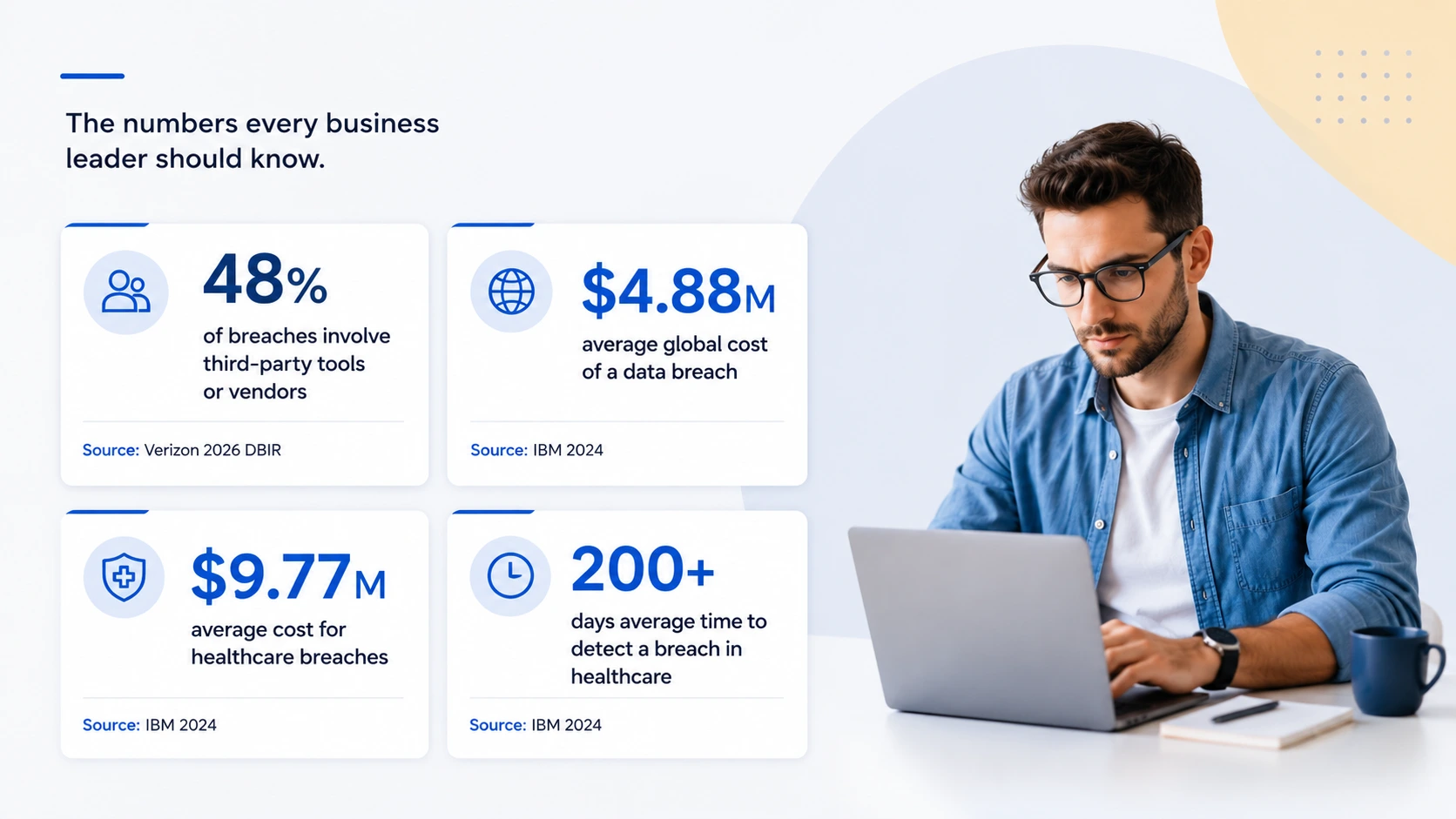
Here's why that matters more than it used to. Verizon's 2026 Data Breach Investigations Report found that outside tools and vendors were involved in 48% of all confirmed breaches this year, up from 30% the year before. Almost half of all breaches now trace back, at least in part, to something connected to a website rather than the core business system itself.
The site still loads. The forms still work. Everything looks fine on the surface. But "looks fine" and "actually fine" are not the same thing and the gap between them is exactly where that 48% comes from.
Here are 8 signs that a gap might already be open on your site, followed by what to do about it.
What you'll learn in this guide:
- Why websites drift out of good shape over time without anyone making a single big mistake
- The 8 warning signs most businesses miss until it's too late
- How maintenance, security, and compliance are different and why you need all three
- How often a website should actually be reviewed
- What a practical maintenance schedule looks like
- Where to start if you're not sure about your current website health
Website Risk Snapshot
8 Website Warning Signs You're Probably Ignoring
Most of these won't feel like red flags at first. They'll feel normal like the way things have always worked. That's exactly what makes them worth checking. A website that looks fine and functions fine can still be carrying real risk underneath, and these eight signs are where that risk most often hides.
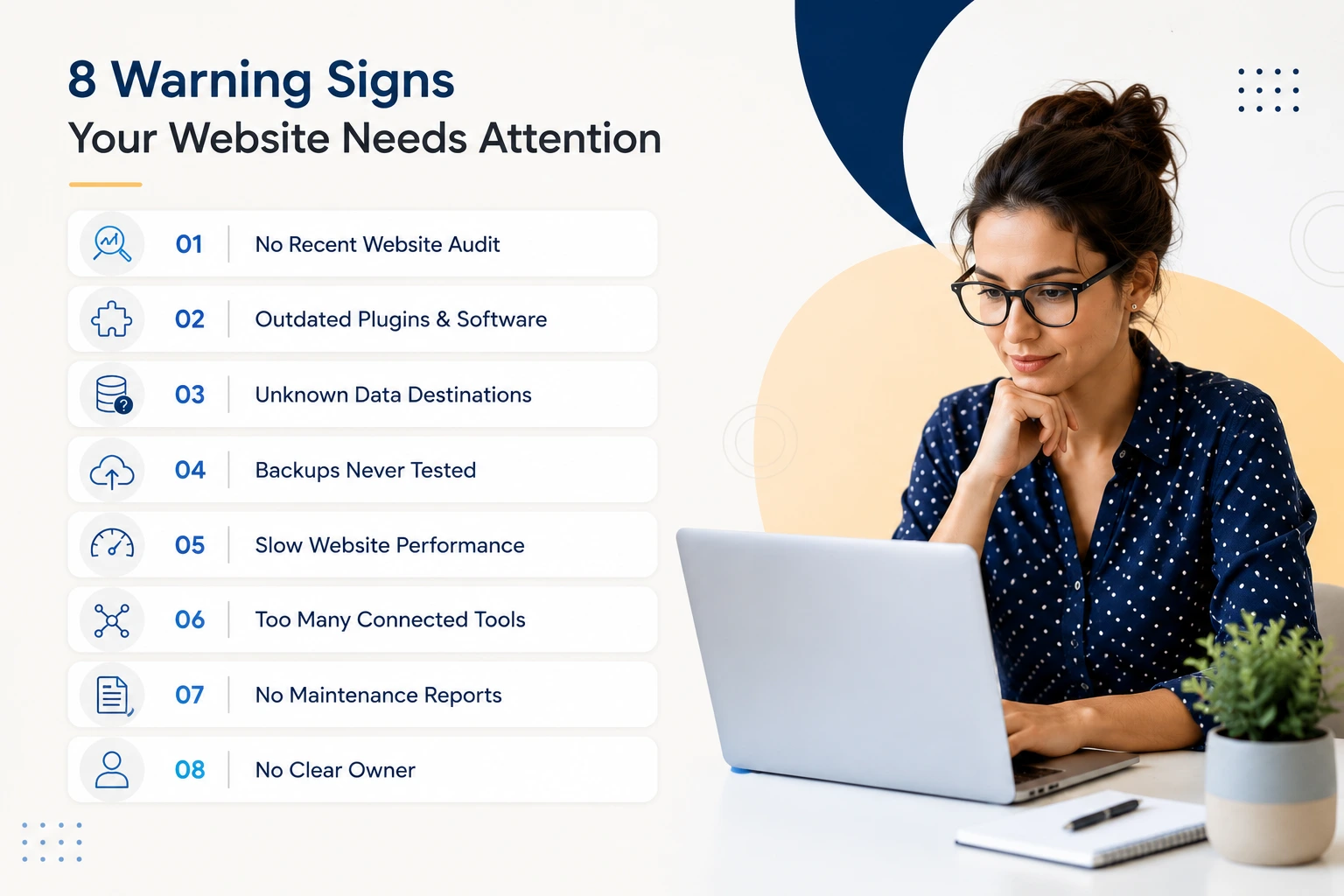
1. Nobody has actually reviewed your website in the last six months
Staying online isn't the same as being reviewed. A real review means someone checks what's running on the site, what it's connected to, and whether anything has changed since the last time someone looked. For most businesses, it's been longer than they'd like to admit.
2. Some of your tools haven't been updated in a while and you're not sure they still can be
A missed update is a small problem. Not knowing whether a tool is still supported at all is a bigger one. Software doesn't stop working when the company behind it stops maintaining it. It just stops getting fixed when new problems are found.
3. Data comes in through your forms, and nobody could say exactly where it goes
A contact form. A booking request. A signup box. Each one sends information somewhere: an inbox, a database, another company's servers. If you asked your team right now where that information ends up, who can see it, and how long it's kept, would you get a clear answer?
4. You have backups, but nobody has ever tested one
A backup you've never restored isn't a safety net. It's a guess. The only way to know a backup actually works is to use it and most businesses find out it doesn't work at the exact moment they need it most.
5. The site feels slower than it used to, and nobody has looked into why
A slow site is easy to shrug off. But it's often the first visible sign of a deeper issue too many scripts loading, a plugin doing more than it should, code that's never been cleaned up. Visitors don't wait around while you figure it out.
6. Tools have been added over the years, and nobody has a full list of what's still connected
Booking widgets. Chat boxes. Tracking scripts. Payment tools. Most businesses, when they sit down and actually list everything connected to their site, are surprised by what they find including tools from projects that ended years ago but are still quietly connected.
7. Nobody could produce a maintenance report if asked today
Not by tomorrow. Not by next week. If putting that together would take real effort, it means nobody has been keeping track and problems have had time and space to build up unnoticed.
8. Ask five people "whose job is it to maintain the website," and you'll get five different answers
Split ownership between marketing, IT, and whoever handles the legal side is one of the clearest signs that something is being missed. When everyone assumes someone else is watching, nobody is.
None of these signs alone means something has gone wrong. But if a few of them are true at once, your website has probably drifted further from "well maintained" than it looks from the outside.
Why Websites Slowly Fall Behind (Without Anyone Noticing)
Every website starts out in good shape. When it launched, everything worked the way it was supposed to. The right people had access, forms sent data where they were meant to, and the site did what everyone expected.
The problem is that "it was fine when we checked" doesn't stay true on its own.
Over time, small changes happen. A plugin updates itself and quietly changes a setting. Someone added a new marketing tool. A vendor changes how their system works on their end without telling you. None of these are mistakes. Each one is a small, reasonable decision made in the moment.
But add enough of them up, and a gap opens between what you think your website is doing and what it's actually doing. Nobody planned for that gap. It just built up, one small change at a time, while nobody was watching the whole picture. We call this compliance drift and it's the reason a website can pass every routine check and still be quietly heading toward a real problem.
Here's why normal maintenance doesn't catch it
In most businesses, three different groups touch the website and each one is watching a different piece of it:
- Marketing keeps content fresh, adds new tools, and runs campaigns. They're not usually thinking about whether a new plugin changes how customer data gets handled. That's not their job.
- IT keeps the software updated, backups running, and the site online. But confirming a plugin is current is a different question from asking what that plugin actually does with the data passing through it.
- Compliance or legal knowledge of what the rules require. But they're rarely in the room when marketing adds a new form or IT swaps out a tool so they often find out about changes long after the fact, if at all.
Each group does its own job well. The problem is the space in between where a marketing decision changes what data gets collected, an IT decision changes how it moves, and nobody is asking whether those two things still line up with what the business is supposed to be doing. Without someone watching that middle space, drift doesn't just happen occasionally. It happens by default.
The Third-Party Tools Running Behind the Scenes
This is worth spelling out, because most businesses underestimate how many outside tools their website actually depends on.
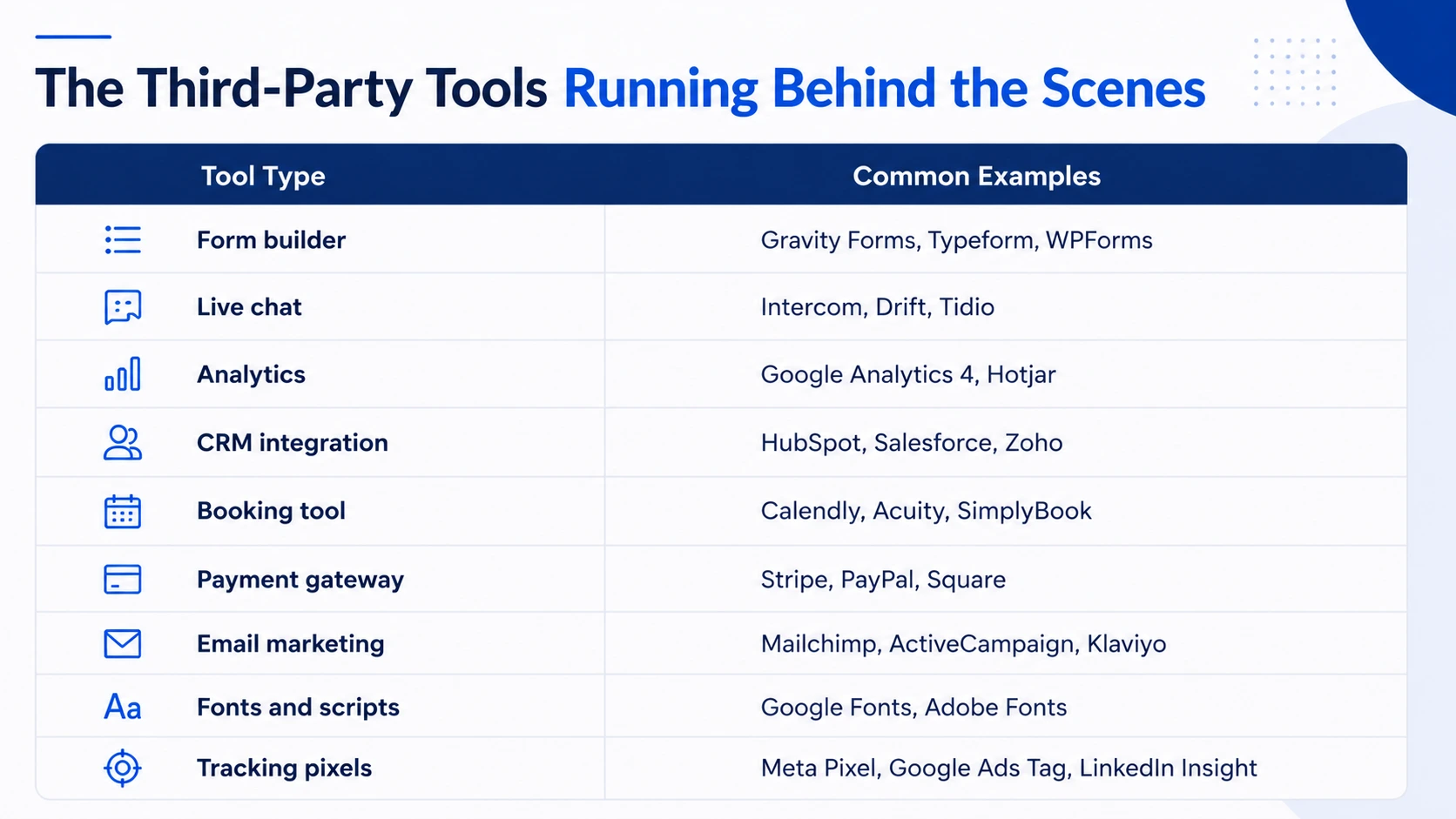
Each of these is built and maintained by a separate company, not yours. When one of them touches a form or a page on your site, it can usually see what's typed into it. Most of the time that's fine, it's exactly what the tool is there to do. But it also means every one of these tools is a small door into your website, built and maintained by someone else, on their own schedule, according to their own decisions.
The problem isn't any one tool. It's that most businesses have never counted how many of these doors exist, or checked whether each one is still supposed to be open.
Every Industry Faces Website Risk Differently
Drift looks similar across most websites, but the consequences vary depending on what kind of data your site handles and what rules apply to it. Here are three industries where it shows up most often.
Healthcare
Patient portals, appointment booking tools, and contact forms on healthcare websites often handle protected health information even when that's not obvious from the homepage. Each outside tool touching that information should have proper vendor paperwork in place. According to IBM's Cost of a Data Breach Report 2024, healthcare is the most expensive industry when a breach occurs, averaging $9.77 million per incident, and it takes healthcare organizations longer than any other sector to detect that something has gone wrong — over 200 days on average. Common drift: a scheduling tool updates its systems, and nobody checks whether the vendor agreement still covers the new setup.
Legal
Law firm websites handle intake forms and sometimes document-sharing portals that contain confidential client information. Keeping that locked down isn't just good practice — it's part of a lawyer's basic professional duty. Drift typically shows up when a new intake form gets added without confirming the data is transmitted securely, or when an old client portal from a previous provider never gets properly shut down.
Financial services
Banks, lenders, and financial advisors operate under rules about how customer financial information must be protected. Customer portals, identity verification tools, and lead-capture forms are all part of the picture. IBM's 2024 data puts the average breach cost for financial services at $6.08 million per incident. Drift here often looks like a sales database sync being adjusted to pull in additional customer information that was never part of the original setup, a small technical change with larger compliance implications nobody flagged.
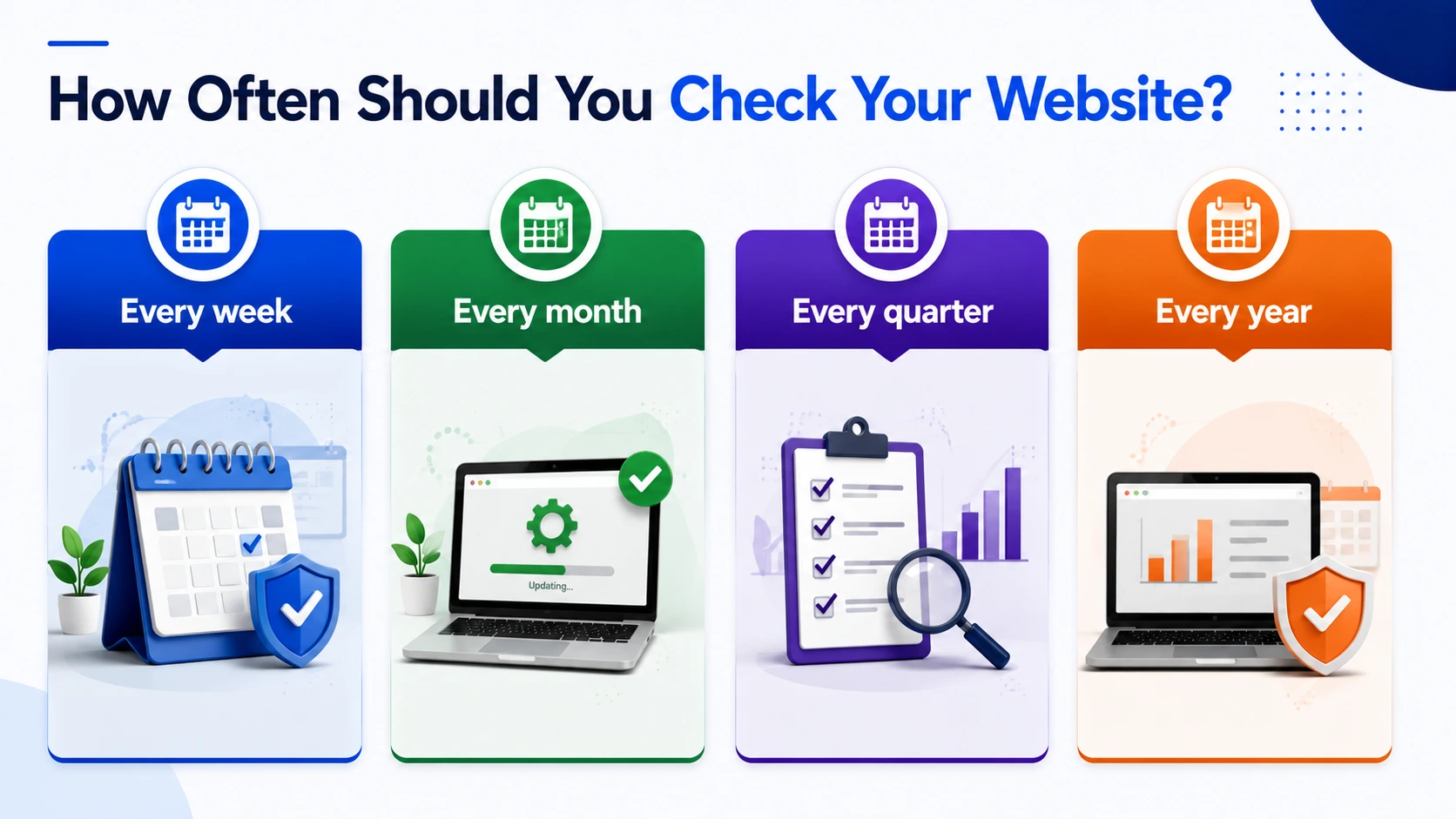
The Difference Between Maintenance, Security & Compliance
Think about a business that updates its plugins every month, has a firewall in place, and hasn't had a single security incident in years. On paper, that looks like a well-maintained, secure website. But if a new form is quietly collecting more data than the privacy policy covers, or a vendor changed how they handle customer information six months ago, the website is out of compliance and none of those good maintenance habits would have caught it.
Maintenance asks whether the website is working properly. Is the software current? Are backups happening? Are pages loading the way they should?
Security asks whether someone could break in. Are there weaknesses an attacker could exploit? Would you notice if someone tried?
Compliance asks something different: does what your website actually does still match what you've told customers it does and what the rules require?
A website can pass the first two checks completely and still fail the third. It can be fully updated and locked down against outside attacks, and still be collecting more information than your privacy policy admits to, or sending data to a vendor whose current practices don't match the agreement you signed three years ago. Nothing about that shows up as "broken." It just quietly stops matching what you promised.
This is why keeping software updated, on its own, isn't enough. An update fixes a known problem inside that one piece of software. It doesn't check what that software does with the information passing through it, or whether a tool has quietly started collecting more than it used to.
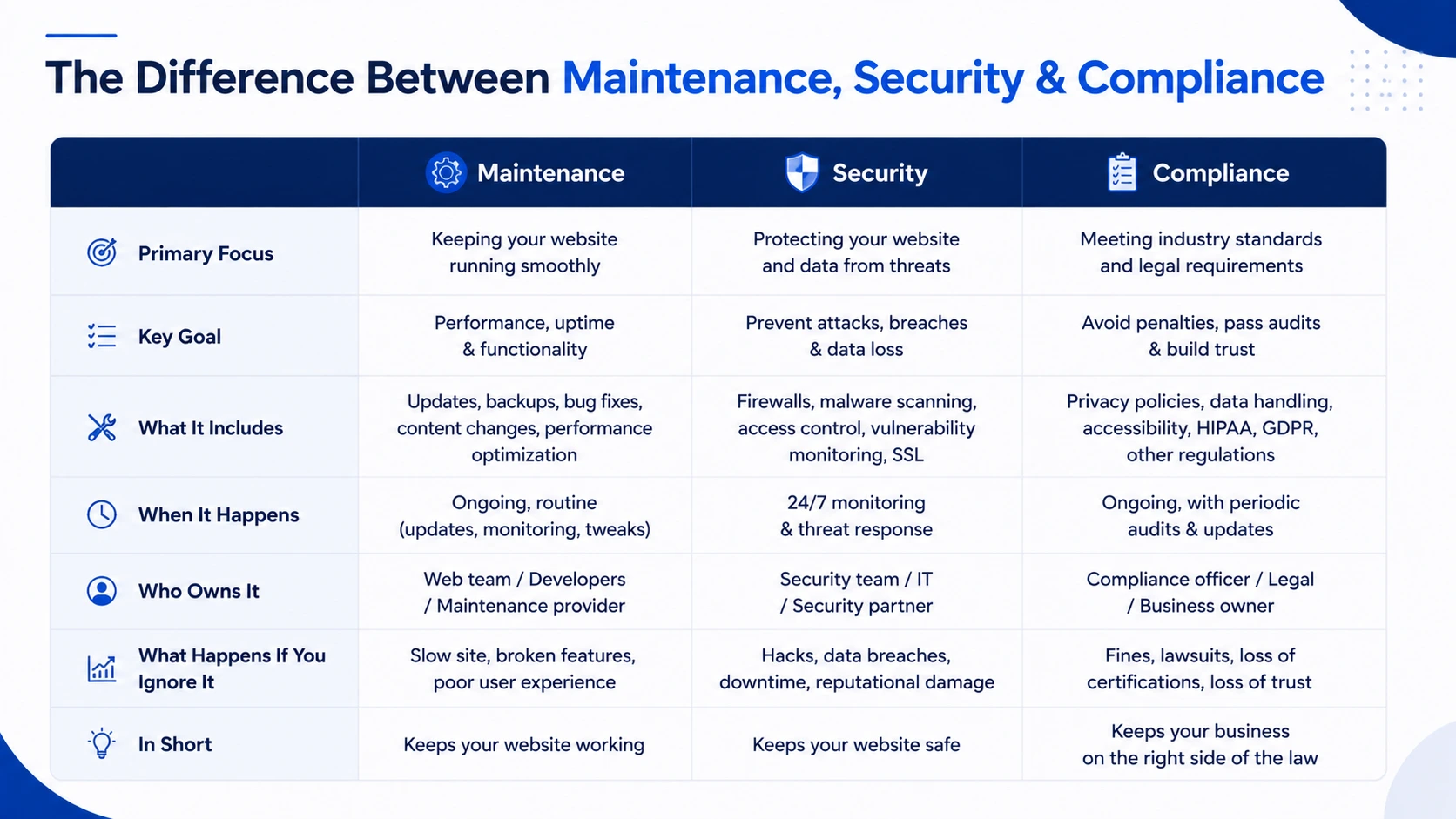
How Often Should You Check Your Website?
The businesses that handle website problems cheaply are almost always the ones that found them early. Early detection isn't luck, it's a schedule. The rhythm below is the minimum most businesses should be running. Regulated industries like healthcare, legal, and financial services should treat it as a floor, not a ceiling.
Every week
- Check for repeated failed login attempts a pattern here is often the earliest sign of a targeted problem
- Confirm backups actually completed, not just that the backup tool is switched on
- Confirm the site had no downtime or errors in the past seven days
Every month
- Install approved updates for plugins, themes, and any core software
- Review who has active accounts and remove anyone who no longer needs access
- Confirm your security certificate is valid and not close to expiring
- Run a basic scan for known weaknesses
Every quarter
- Review every outside tool and vendor connected to your site including old ones nobody thinks about anymore
- Confirm data is actually flowing where you think it's going
- Review who has access to what, and whether that still makes sense
Every year
- Have someone try to break in on purpose, before someone else does it without permission
- Do a full review of how everything is set up
- Test whether you could actually restore your site from a backup if you had to
- Update your internal records to reflect how the site really works today
This won't remove every risk. Nothing does. But it creates regular checkpoints where small problems get caught while they're still small, which is the difference between a two-hour fix and a two-week incident response.
Common Website Maintenance Mistakes to Avoid
These aren't rare. They're the default. If you haven't deliberately built a process to avoid each one of them, there's a reasonable chance at least two or three are true of your website right now not because something went wrong, but because nobody specifically made sure they went right.
Treating maintenance as a purely technical task confirming the site is fast and updated, without ever asking what data is being collected or where it goes.
Having no master list of outside tools. Most businesses are genuinely surprised by what they find once they actually sit down and list everything connected to their site, including tools from projects that ended years ago.
Letting vendor agreements go stale. A contract signed years ago gets treated as still accurate, even though the tool itself has changed significantly since then.
Only reacting when something visibly breaks instead of checking in on a regular schedule.
Assuming "secure" automatically means "compliant." Strong security lowers the chance of a break-in. It doesn't guarantee that what you're actually doing still matches what you've promised. Those are related, but they're not the same thing.
Assuming someone else is watching. When ownership is split between marketing, IT, and legal with no one coordinating, the space in the middle where most drift actually happens goes unwatched by everyone.
The Real Cost of Ignoring Website Problems
A security or compliance gap on your website rarely announces itself. Instead, it usually surfaces the hard way through a customer complaint, a client's due-diligence questions, an audit, or an actual incident. By the time that happens, the fix is no longer a quick one. It's a full investigation into what changed, when, and who has been affected on top of whatever damage has already been done to trust.
The numbers put a real figure on this. IBM's Cost of a Data Breach Report 2024 puts the global average cost of a data breach at $4.88 million and considerably higher in regulated industries. Breaches connected to third-party tools and vendors, the exact category this article covers, now account for nearly half of all incidents according to Verizon's 2026 DBIR. And the longer a gap goes undetected, the more expensive it tends to be to resolve.
The businesses that avoid this outcome aren't the ones with the biggest budgets. They're the ones that catch small issues while they're still small, through a regular habit of checking not through luck. If you're building that habit from scratch, our complete guide to website maintenance covers what that rhythm should look like across weekly, monthly, quarterly, and annual tasks.
Let's See How Healthy Your Website Really Is
This takes about two minutes. It won't tell you everything about your website's health, but it will tell you whether the basics are covered and for most businesses, that's exactly where the gaps are. Go through each item based on what you know for certain, not what you assume is probably being handled.
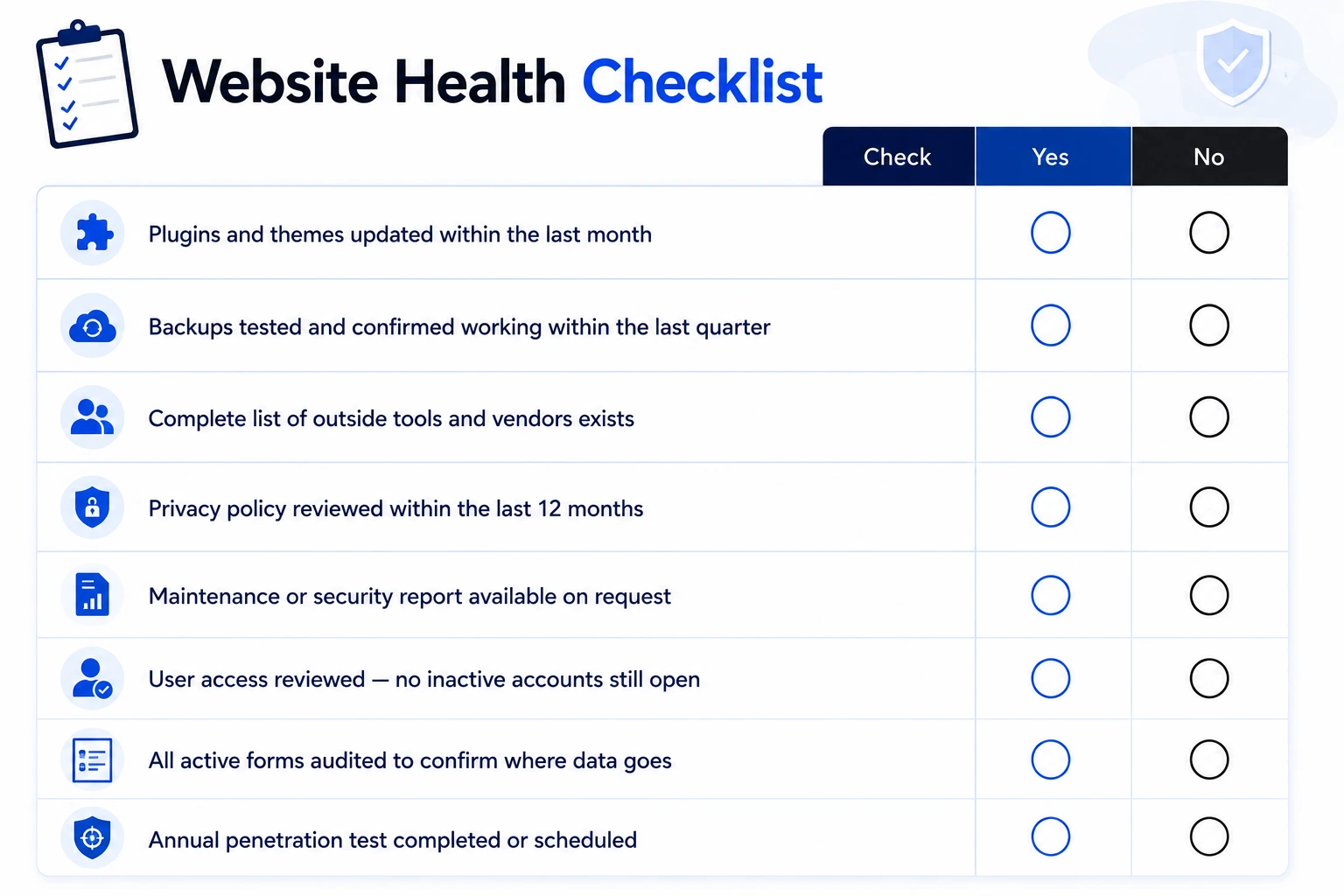
How to read your website score:
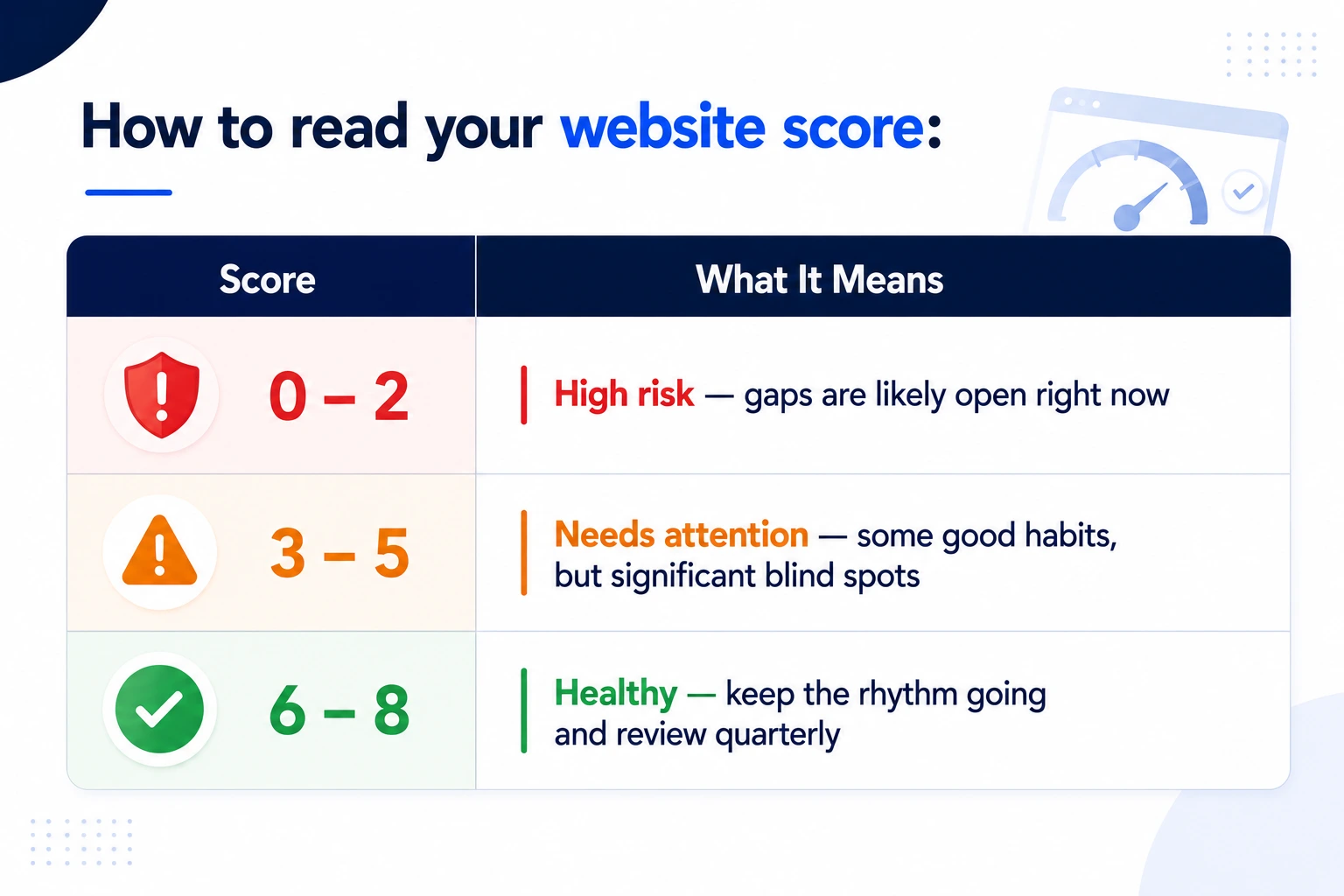
If you scored below 5, the "Where to Start" section at the bottom of this page is the right next step.
Not Sure Where to Begin? Start Here
You don't need to fix everything this week. You need to know where you actually stand.
Start with one task: list every outside tool currently connected to your website, every form, every booking widget, every chat box, every tracking script. Most businesses find at least one thing on that list they'd forgotten about and sometimes several.
If that exercise turns up more than you expected, or if you couldn't confidently answer several of the 8 questions at the top of this article, it's worth having someone take a structured look at your site before small gaps become bigger problems.
Get a free website health check from JanBask Digital Design →